
One component I used when building my recent Copilot Credits Calculator was the Power BI input slicer.
See it here > Copilot Credits: Managing Consumption – Home
And out of the whole report it’s one area that the Power BI community messaged me about the most: “How do you get exact number input in Power BI?”
I had a requirement for users of the report to be able to accurately input the number of end users overall within their tenant. This would then be used as part of a numeric series to combine with measures and calculate the desired results.
The problem with numeric ranges and slicers
Now if you have ever used numeric ranges and used the slider that you can auto add when creating, if creating a relatively large series with potentially an increment of 1, it won’t be as accurate as you might be looking for.
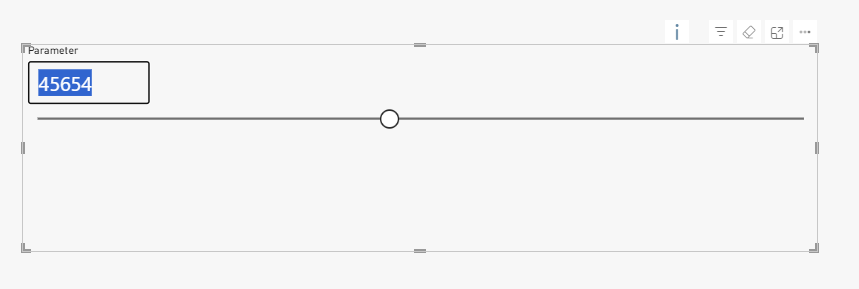
For example, generate a series of 100,000 and then try typing in a number. I typed in 45,678 and this is what the slicer returned (45,654). Not exact, not accurate. Not so great when we are trying to define financial potential.
Exact number input in Power BI with an Input Slicer
The input slicer, thankfully works a little differently! Instead of using the usual numeric range, let’s make our own instead.
- Create a new table
TotalUsersSeries = GENERATESERIES(1,100000,1)So a series of 1 to 100,000 with an increment of 1.
GENERATESERIES function – DAX | Microsoft Learn
In this instance the table can be completely disconnected from the rest of the model, so negligible impact to performance here.
- Then create a measure, as below so we can use it within other measures and calculations. Worth noting the 1000 at the end of the measure is to give the measure a default value.
TotalUsers = SELECTEDVALUE(TotalUsersSeries[Value],1000)SELECTEDVALUE function – DAX | Microsoft Learn
- Next add in your Input Slicer and add the [Value] column from the TotalUsersSeries table.
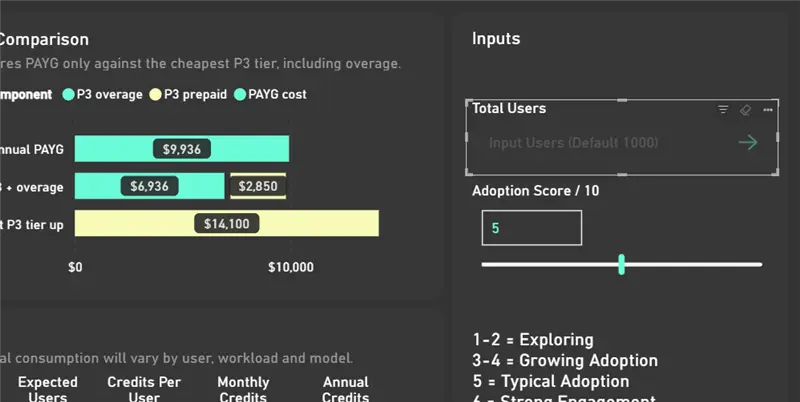
And there you have it! An accurate input box for what-if scenarios. Format the slicer and change the default text so it suits your report.
Leave a Reply